David's Astronomy Pages
Notes - Session 1373 (2025-11-08)

Notes
(S1372)

Notes
Main
Home
Page

Notes
(S1374)
David's Astronomy Pages
|
Notes (S1372) |
Notes Main |
Home Page |
Notes (S1374) |
Main aims
Equipment & Software
Highlights
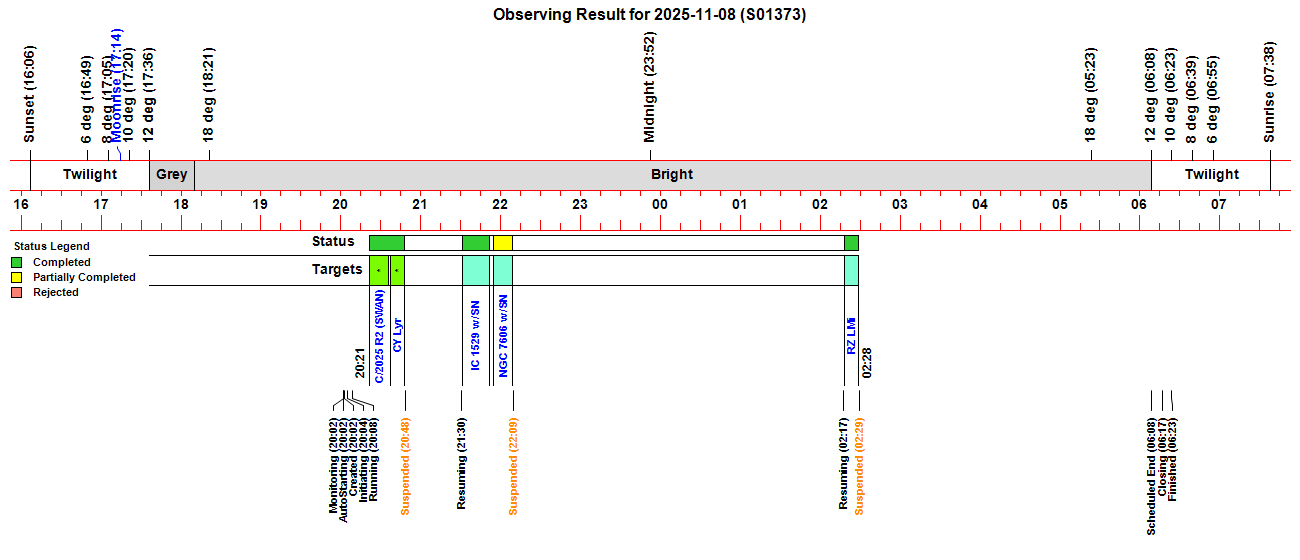
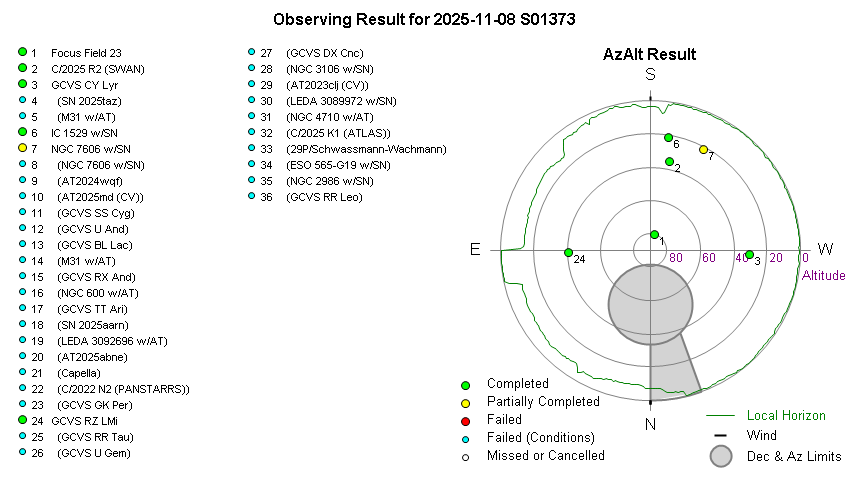
 Targets. 4/34 planned targets were completed with a further
1 target
partially completed. Other targets failed due to fog, cloud & session
suspension.
Targets. 4/34 planned targets were completed with a further
1 target
partially completed. Other targets failed due to fog, cloud & session
suspension. CCD Camera.
No issues with CCD Camera during session.. Dome.
No issues opening/closing the shutter during
the session, and the dome was successfully parked at the end of the session..
CCD Camera.
No issues with CCD Camera during session.. Dome.
No issues opening/closing the shutter during
the session, and the dome was successfully parked at the end of the session..
Summary Plots & Logs
Observing Plan 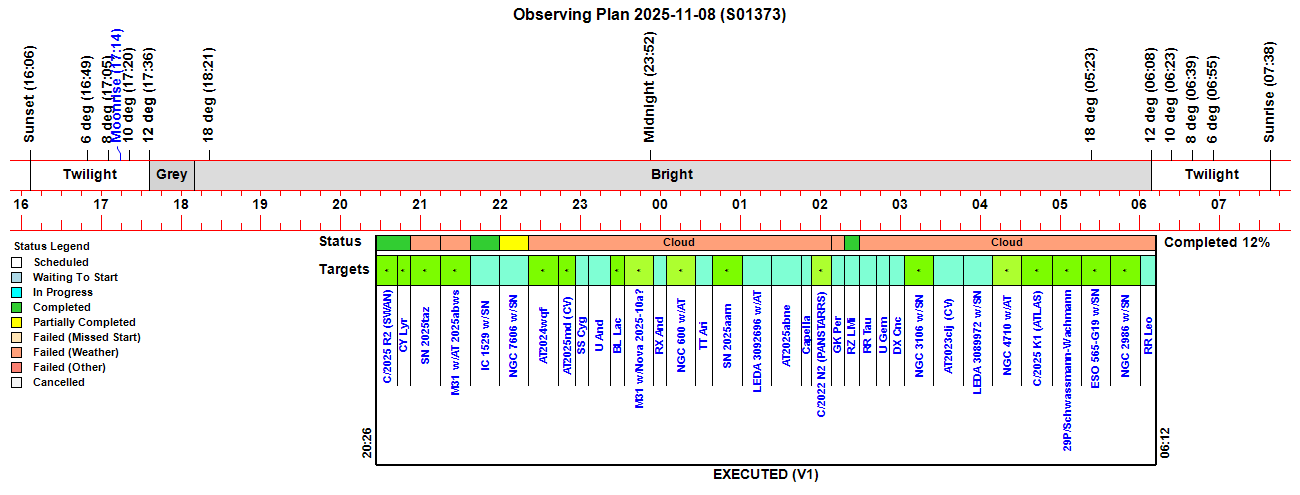 |
||||||||||||||||||||||||||||||||||||||||||||||||||||||||||||||||||||||||||||||||||||||||||||||||||||||||||||||||||||||||||||||||||||||||||||||||||||||||||||||||||||||||||||||||||||||||||||||||||||||||||||||||||||||||||||||||||||||||||||||||||||||||||||||||||||||||||||||||||||||||||||||||||||||||||||||||||||||||||||||||||||||||||||||||||||||||||||||||||||||||||||||||||||||||||||||||||||||||||||||||||||||||||||||||||||||||||||||||||||||||||||||||||||||||||||||||||||
|
Observing Result |
||||||||||||||||||||||||||||||||||||||||||||||||||||||||||||||||||||||||||||||||||||||||||||||||||||||||||||||||||||||||||||||||||||||||||||||||||||||||||||||||||||||||||||||||||||||||||||||||||||||||||||||||||||||||||||||||||||||||||||||||||||||||||||||||||||||||||||||||||||||||||||||||||||||||||||||||||||||||||||||||||||||||||||||||||||||||||||||||||||||||||||||||||||||||||||||||||||||||||||||||||||||||||||||||||||||||||||||||||||||||||||||||||||||||||||||||||||
 |
||||||||||||||||||||||||||||||||||||||||||||||||||||||||||||||||||||||||||||||||||||||||||||||||||||||||||||||||||||||||||||||||||||||||||||||||||||||||||||||||||||||||||||||||||||||||||||||||||||||||||||||||||||||||||||||||||||||||||||||||||||||||||||||||||||||||||||||||||||||||||||||||||||||||||||||||||||||||||||||||||||||||||||||||||||||||||||||||||||||||||||||||||||||||||||||||||||||||||||||||||||||||||||||||||||||||||||||||||||||||||||||||||||||||||||||||||||
 |
||||||||||||||||||||||||||||||||||||||||||||||||||||||||||||||||||||||||||||||||||||||||||||||||||||||||||||||||||||||||||||||||||||||||||||||||||||||||||||||||||||||||||||||||||||||||||||||||||||||||||||||||||||||||||||||||||||||||||||||||||||||||||||||||||||||||||||||||||||||||||||||||||||||||||||||||||||||||||||||||||||||||||||||||||||||||||||||||||||||||||||||||||||||||||||||||||||||||||||||||||||||||||||||||||||||||||||||||||||||||||||||||||||||||||||||||||||
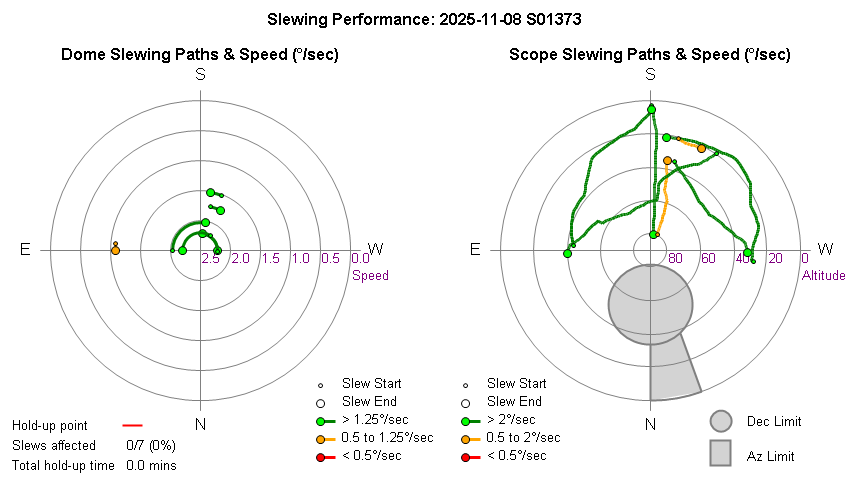
| Dome & Scope Slewing Performance | ||||||||||||||||||||||||||||||||||||||||||||||||||||||||||||||||||||||||||||||||||||||||||||||||||||||||||||||||||||||||||||||||||||||||||||||||||||||||||||||||||||||||||||||||||||||||||||||||||||||||||||||||||||||||||||||||||||||||||||||||||||||||||||||||||||||||||||||||||||||||||||||||||||||||||||||||||||||||||||||||||||||||||||||||||||||||||||||||||||||||||||||||||||||||||||||||||||||||||||||||||||||||||||||||||||||||||||||||||||||||||||||||||||||||||||||||||||
 |
||||||||||||||||||||||||||||||||||||||||||||||||||||||||||||||||||||||||||||||||||||||||||||||||||||||||||||||||||||||||||||||||||||||||||||||||||||||||||||||||||||||||||||||||||||||||||||||||||||||||||||||||||||||||||||||||||||||||||||||||||||||||||||||||||||||||||||||||||||||||||||||||||||||||||||||||||||||||||||||||||||||||||||||||||||||||||||||||||||||||||||||||||||||||||||||||||||||||||||||||||||||||||||||||||||||||||||||||||||||||||||||||||||||||||||||||||||
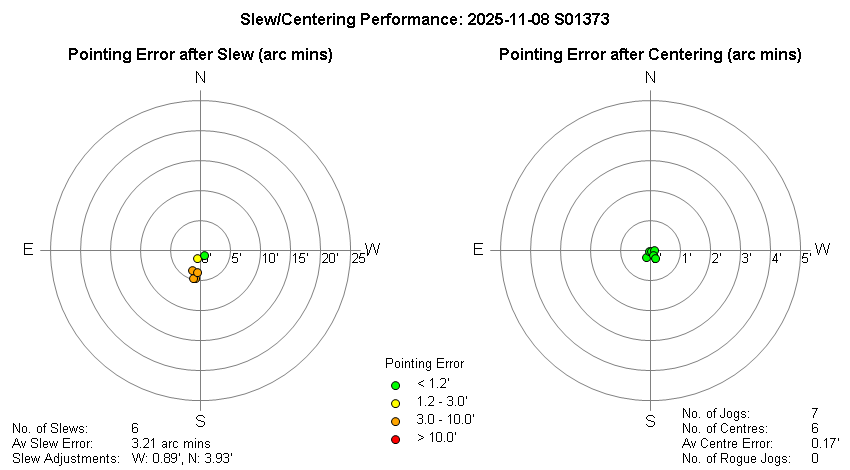
| Slew/Centering Performance | ||||||||||||||||||||||||||||||||||||||||||||||||||||||||||||||||||||||||||||||||||||||||||||||||||||||||||||||||||||||||||||||||||||||||||||||||||||||||||||||||||||||||||||||||||||||||||||||||||||||||||||||||||||||||||||||||||||||||||||||||||||||||||||||||||||||||||||||||||||||||||||||||||||||||||||||||||||||||||||||||||||||||||||||||||||||||||||||||||||||||||||||||||||||||||||||||||||||||||||||||||||||||||||||||||||||||||||||||||||||||||||||||||||||||||||||||||||
 |
||||||||||||||||||||||||||||||||||||||||||||||||||||||||||||||||||||||||||||||||||||||||||||||||||||||||||||||||||||||||||||||||||||||||||||||||||||||||||||||||||||||||||||||||||||||||||||||||||||||||||||||||||||||||||||||||||||||||||||||||||||||||||||||||||||||||||||||||||||||||||||||||||||||||||||||||||||||||||||||||||||||||||||||||||||||||||||||||||||||||||||||||||||||||||||||||||||||||||||||||||||||||||||||||||||||||||||||||||||||||||||||||||||||||||||||||||||
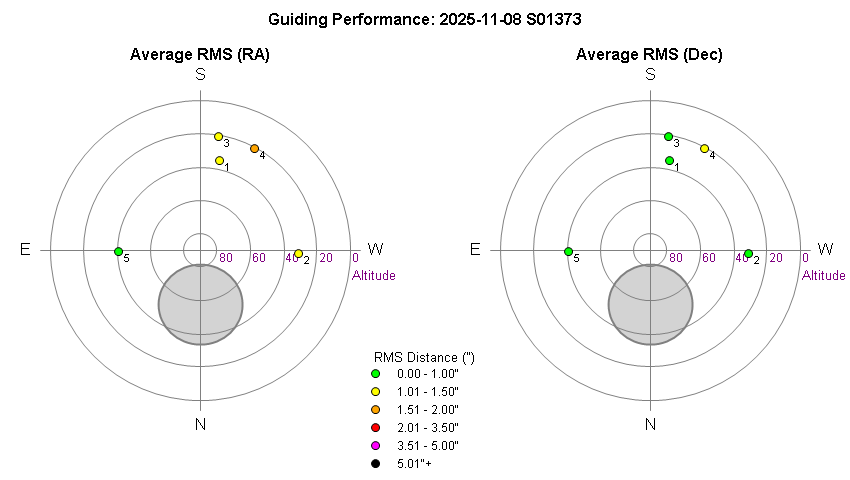
| Guiding Performance | ||||||||||||||||||||||||||||||||||||||||||||||||||||||||||||||||||||||||||||||||||||||||||||||||||||||||||||||||||||||||||||||||||||||||||||||||||||||||||||||||||||||||||||||||||||||||||||||||||||||||||||||||||||||||||||||||||||||||||||||||||||||||||||||||||||||||||||||||||||||||||||||||||||||||||||||||||||||||||||||||||||||||||||||||||||||||||||||||||||||||||||||||||||||||||||||||||||||||||||||||||||||||||||||||||||||||||||||||||||||||||||||||||||||||||||||||||||
 |
||||||||||||||||||||||||||||||||||||||||||||||||||||||||||||||||||||||||||||||||||||||||||||||||||||||||||||||||||||||||||||||||||||||||||||||||||||||||||||||||||||||||||||||||||||||||||||||||||||||||||||||||||||||||||||||||||||||||||||||||||||||||||||||||||||||||||||||||||||||||||||||||||||||||||||||||||||||||||||||||||||||||||||||||||||||||||||||||||||||||||||||||||||||||||||||||||||||||||||||||||||||||||||||||||||||||||||||||||||||||||||||||||||||||||||||||||||
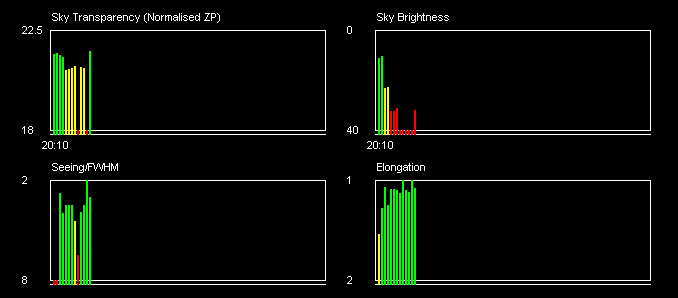
| Sky Conditions (Locate Frames) | ||||||||||||||||||||||||||||||||||||||||||||||||||||||||||||||||||||||||||||||||||||||||||||||||||||||||||||||||||||||||||||||||||||||||||||||||||||||||||||||||||||||||||||||||||||||||||||||||||||||||||||||||||||||||||||||||||||||||||||||||||||||||||||||||||||||||||||||||||||||||||||||||||||||||||||||||||||||||||||||||||||||||||||||||||||||||||||||||||||||||||||||||||||||||||||||||||||||||||||||||||||||||||||||||||||||||||||||||||||||||||||||||||||||||||||||||||||
 |
||||||||||||||||||||||||||||||||||||||||||||||||||||||||||||||||||||||||||||||||||||||||||||||||||||||||||||||||||||||||||||||||||||||||||||||||||||||||||||||||||||||||||||||||||||||||||||||||||||||||||||||||||||||||||||||||||||||||||||||||||||||||||||||||||||||||||||||||||||||||||||||||||||||||||||||||||||||||||||||||||||||||||||||||||||||||||||||||||||||||||||||||||||||||||||||||||||||||||||||||||||||||||||||||||||||||||||||||||||||||||||||||||||||||||||||||||||
|
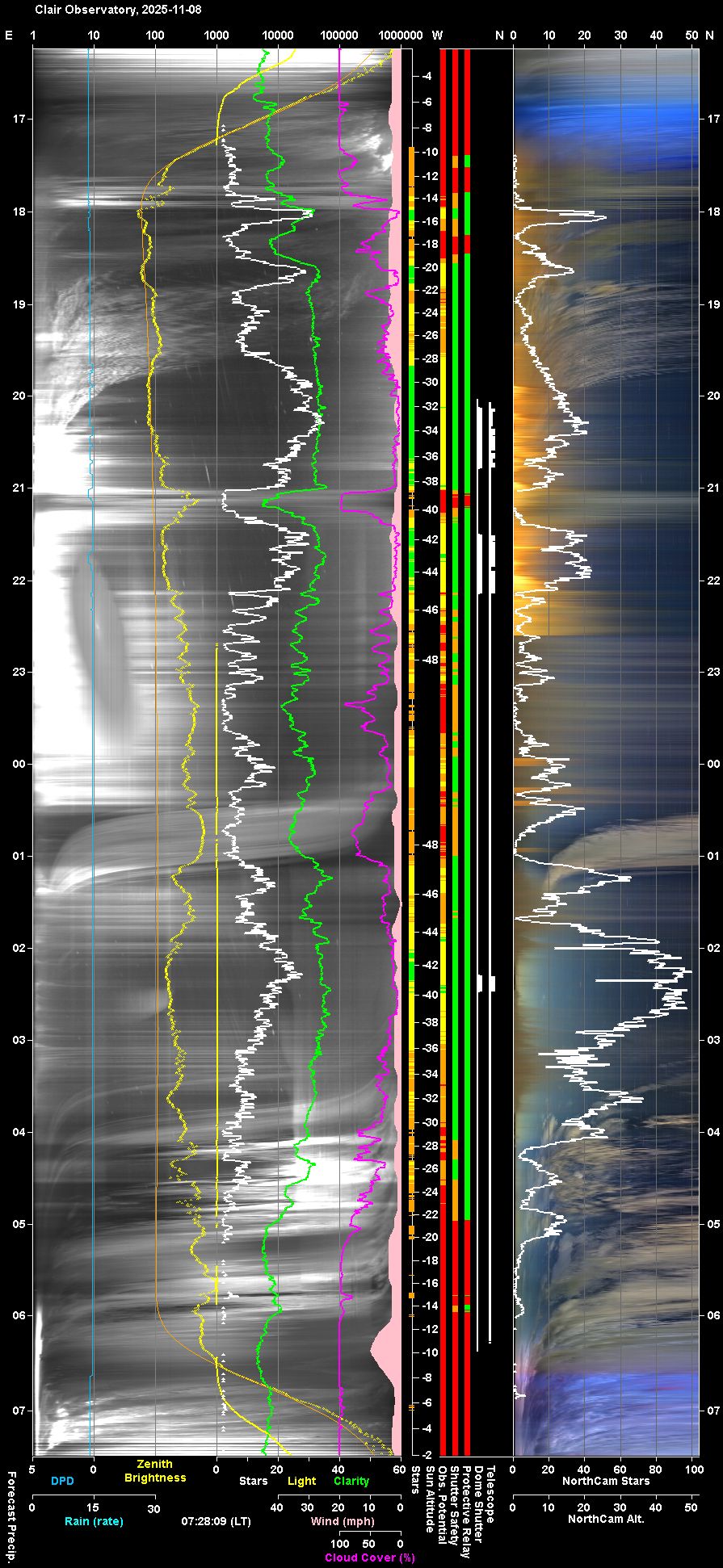
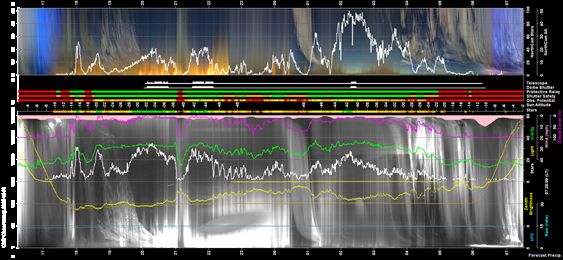
Night Sky Summary Plot Top axis: Sky Brightness at Zenith (in ADU/s) Lefthand axis: Local Time (hh LT). Righthand axis: Sun Altitude (degs) Note: The NorthCam Star Count line is unreliable and should be ignored (The AstroNorthCam 'Find' Star method is producing many false positives from clouds) |
||||||||||||||||||||||||||||||||||||||||||||||||||||||||||||||||||||||||||||||||||||||||||||||||||||||||||||||||||||||||||||||||||||||||||||||||||||||||||||||||||||||||||||||||||||||||||||||||||||||||||||||||||||||||||||||||||||||||||||||||||||||||||||||||||||||||||||||||||||||||||||||||||||||||||||||||||||||||||||||||||||||||||||||||||||||||||||||||||||||||||||||||||||||||||||||||||||||||||||||||||||||||||||||||||||||||||||||||||||||||||||||||||||||||||||||||||||
 |
||||||||||||||||||||||||||||||||||||||||||||||||||||||||||||||||||||||||||||||||||||||||||||||||||||||||||||||||||||||||||||||||||||||||||||||||||||||||||||||||||||||||||||||||||||||||||||||||||||||||||||||||||||||||||||||||||||||||||||||||||||||||||||||||||||||||||||||||||||||||||||||||||||||||||||||||||||||||||||||||||||||||||||||||||||||||||||||||||||||||||||||||||||||||||||||||||||||||||||||||||||||||||||||||||||||||||||||||||||||||||||||||||||||||||||||||||||
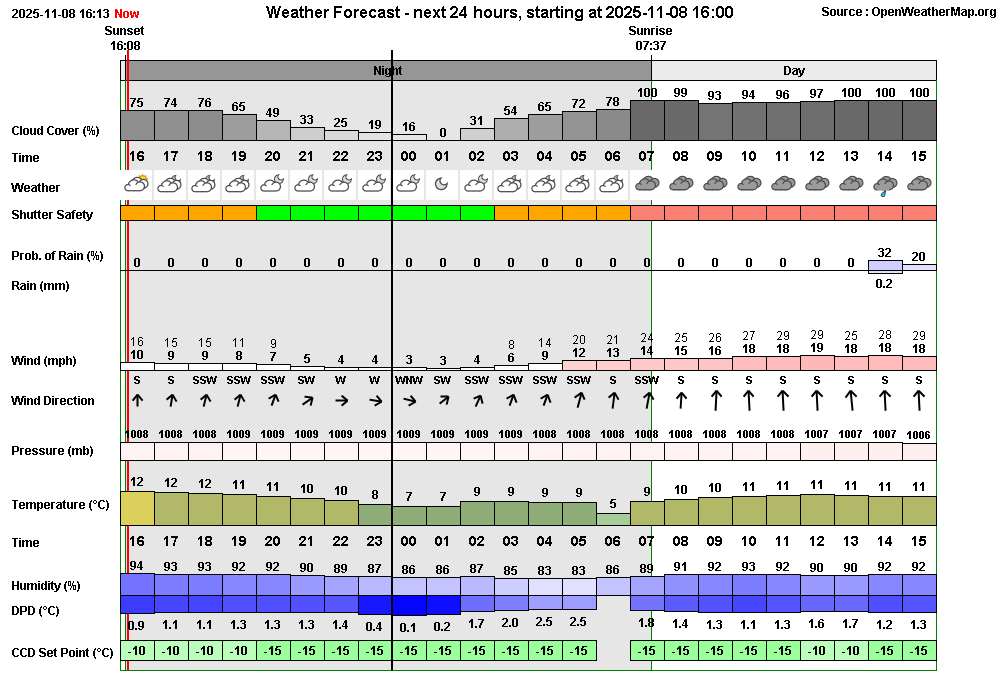
| Actual Weather vs Pre-Session Weather Forecast | ||||||||||||||||||||||||||||||||||||||||||||||||||||||||||||||||||||||||||||||||||||||||||||||||||||||||||||||||||||||||||||||||||||||||||||||||||||||||||||||||||||||||||||||||||||||||||||||||||||||||||||||||||||||||||||||||||||||||||||||||||||||||||||||||||||||||||||||||||||||||||||||||||||||||||||||||||||||||||||||||||||||||||||||||||||||||||||||||||||||||||||||||||||||||||||||||||||||||||||||||||||||||||||||||||||||||||||||||||||||||||||||||||||||||||||||||||||
 |
||||||||||||||||||||||||||||||||||||||||||||||||||||||||||||||||||||||||||||||||||||||||||||||||||||||||||||||||||||||||||||||||||||||||||||||||||||||||||||||||||||||||||||||||||||||||||||||||||||||||||||||||||||||||||||||||||||||||||||||||||||||||||||||||||||||||||||||||||||||||||||||||||||||||||||||||||||||||||||||||||||||||||||||||||||||||||||||||||||||||||||||||||||||||||||||||||||||||||||||||||||||||||||||||||||||||||||||||||||||||||||||||||||||||||||||||||||
 |
||||||||||||||||||||||||||||||||||||||||||||||||||||||||||||||||||||||||||||||||||||||||||||||||||||||||||||||||||||||||||||||||||||||||||||||||||||||||||||||||||||||||||||||||||||||||||||||||||||||||||||||||||||||||||||||||||||||||||||||||||||||||||||||||||||||||||||||||||||||||||||||||||||||||||||||||||||||||||||||||||||||||||||||||||||||||||||||||||||||||||||||||||||||||||||||||||||||||||||||||||||||||||||||||||||||||||||||||||||||||||||||||||||||||||||||||||||
| Session Event Log | ||||||||||||||||||||||||||||||||||||||||||||||||||||||||||||||||||||||||||||||||||||||||||||||||||||||||||||||||||||||||||||||||||||||||||||||||||||||||||||||||||||||||||||||||||||||||||||||||||||||||||||||||||||||||||||||||||||||||||||||||||||||||||||||||||||||||||||||||||||||||||||||||||||||||||||||||||||||||||||||||||||||||||||||||||||||||||||||||||||||||||||||||||||||||||||||||||||||||||||||||||||||||||||||||||||||||||||||||||||||||||||||||||||||||||||||||||||
|
||||||||||||||||||||||||||||||||||||||||||||||||||||||||||||||||||||||||||||||||||||||||||||||||||||||||||||||||||||||||||||||||||||||||||||||||||||||||||||||||||||||||||||||||||||||||||||||||||||||||||||||||||||||||||||||||||||||||||||||||||||||||||||||||||||||||||||||||||||||||||||||||||||||||||||||||||||||||||||||||||||||||||||||||||||||||||||||||||||||||||||||||||||||||||||||||||||||||||||||||||||||||||||||||||||||||||||||||||||||||||||||||||||||||||||||||||||
| Session Alerts & Alarms | ||||||||||||||||||||||||||||||||||||||||||||||||||||||||||||||||||||||||||||||||||||||||||||||||||||||||||||||||||||||||||||||||||||||||||||||||||||||||||||||||||||||||||||||||||||||||||||||||||||||||||||||||||||||||||||||||||||||||||||||||||||||||||||||||||||||||||||||||||||||||||||||||||||||||||||||||||||||||||||||||||||||||||||||||||||||||||||||||||||||||||||||||||||||||||||||||||||||||||||||||||||||||||||||||||||||||||||||||||||||||||||||||||||||||||||||||||||
|
||||||||||||||||||||||||||||||||||||||||||||||||||||||||||||||||||||||||||||||||||||||||||||||||||||||||||||||||||||||||||||||||||||||||||||||||||||||||||||||||||||||||||||||||||||||||||||||||||||||||||||||||||||||||||||||||||||||||||||||||||||||||||||||||||||||||||||||||||||||||||||||||||||||||||||||||||||||||||||||||||||||||||||||||||||||||||||||||||||||||||||||||||||||||||||||||||||||||||||||||||||||||||||||||||||||||||||||||||||||||||||||||||||||||||||||||||||
Back to Top
 Fixed 2025-11-09
(Observatory Computer)
Fixed 2025-11-09
(Observatory Computer) 2025-11-05
07:24:46, outage 6.1 mins
2025-11-06 07:27:07,
outage 7.5 mins
2025-11-07 07:29:13, outage 5.2 mins
2025-11-09 07:35:11, outage 5.8 mins
To be
investigated. Examining this morning's case (2025-11-09) the red alert time
indicates that last valid Synposis record was at 07:30:11.
AllSky Logs show that all Synopsis records between 07:30:14 and 07:36:05
were written out with the timestamp '2025-11-09T07:30:10Z'. This period (5.7
mins) is longer than 5 min which explains why AstroMain produced a red
alert. The previous day (2025-11-08), Synposis record timestamps
were 'stuck' on 07:27:38Z between 07:27:42 and 07:31:02, but this period
(3.23 mins) is less than 5 mins and therefore didn't lead to a red alert.
Conclusion is that the fix attempted in AstroAllSky 3.25.3 didn't work.
Examining code showed that the attempted fix had a flaw so that Synopsis
Time wasn't getting updated after each Panorama Video creation. Flaw
corrected in AstroAllSky 3.25.4, which finally fixes the issue. A
'Synopsis.Time = DateTime.UtcNow' code line has now been added to
CreatePanoramaVideo(), complementing the previous addition to
CreateAllSkyVideo(). Fixed 2025-11-09 (AstroAllSky 3.25.4)
Closed
after review 2025-11-10 (NorthCam Imaging) Fixed 2025-11-10 (Observatory, UPB, Dew Heaters)
Resolved 2025-11-13 (Observatory, Ecowitt GW2000 Gateway Hub,
AllSky Computing Bay)
Resolved / Closed after review 2025-11-09 (AllSky/Weather Computer)
Fix attempted 2025-11-11 (Observatory Computer, AllSky Computer,
Dimension 4)
Resolved 2025-11-10 (AllSky/Weather Computer, CumulusMX, User
Awareness)
Resolved 2025-11-10 (Observatory Computer, ACDSee)
Fixed 2025-11-11 (AstroMain 3.78.4)
Fixed 2025-11-11 (AstroMain 3.78.4)
Fixed 2025-11-11 (AstroWeather 1.28.3)
Fixed 2025-11-17. (Observatory Website / Home Page)
Done 2025-11-09 (AstroWeather 1.28.2) Done 2025-11-09
(Observatory Computer, UPB Powerbox, Pegasus Unity) Closed 2025-11-10 (Pegasus Astro,
UPB v3 Dew Heater Outputs) Done
2025-11-11 (Observatory Website) Done
2025-11-11 (Observatory Website, AstroWeather 1.28.3) Done 2025-11-19 (AstroPlan 1.44) Done 2025-11-24 (AstroObsCam
1.12.2) Done 2025-11-28 (AstroPlan 1.44.1) Done 2025-12-09 (Ekowitt Weather Station, PegasusAstro USB Control Hub)Back to Top Issue, Back to Top
Fig 1. Light Pollution Issue in North Sky (2025-11-08)
Fig 1a) Light pollution in northern sky during the evening of 2025-11-08 is evident in the two NorthCam Images taken at 21:52 & 22:14. The orange glow comes from low level fog and occasional passing clouds being lit up by the light from a line of lanterns / lights along a garden fence line in the neighbouring estate to the north, around 150m away. There is also increased glow from streetlights on the estate. Fortunately this seems to have been a single night issue (a weekend Guy Fawkes party ?) combined with foggy conditions.
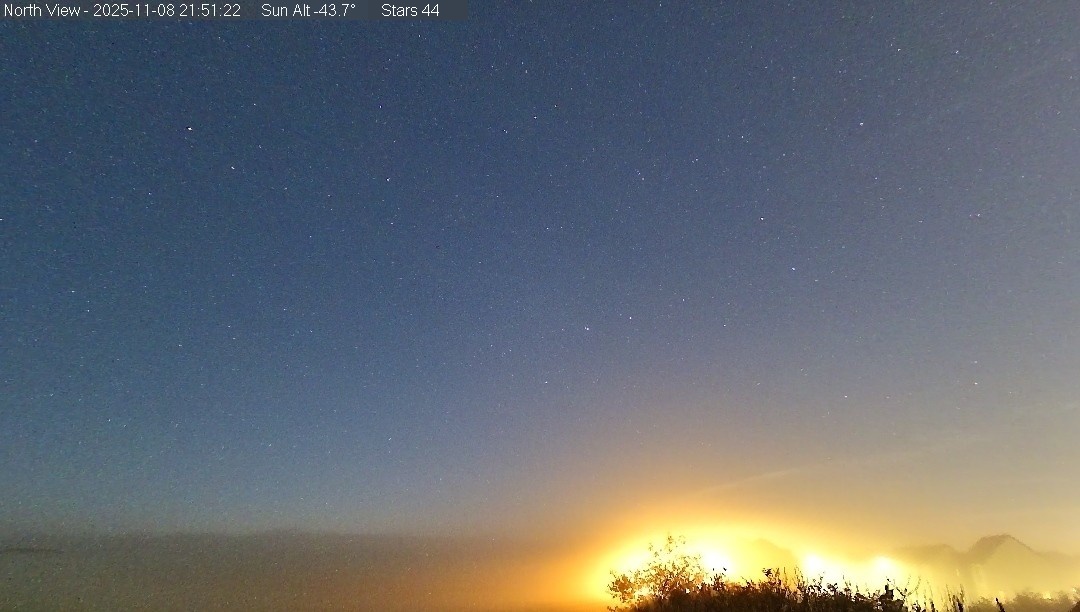
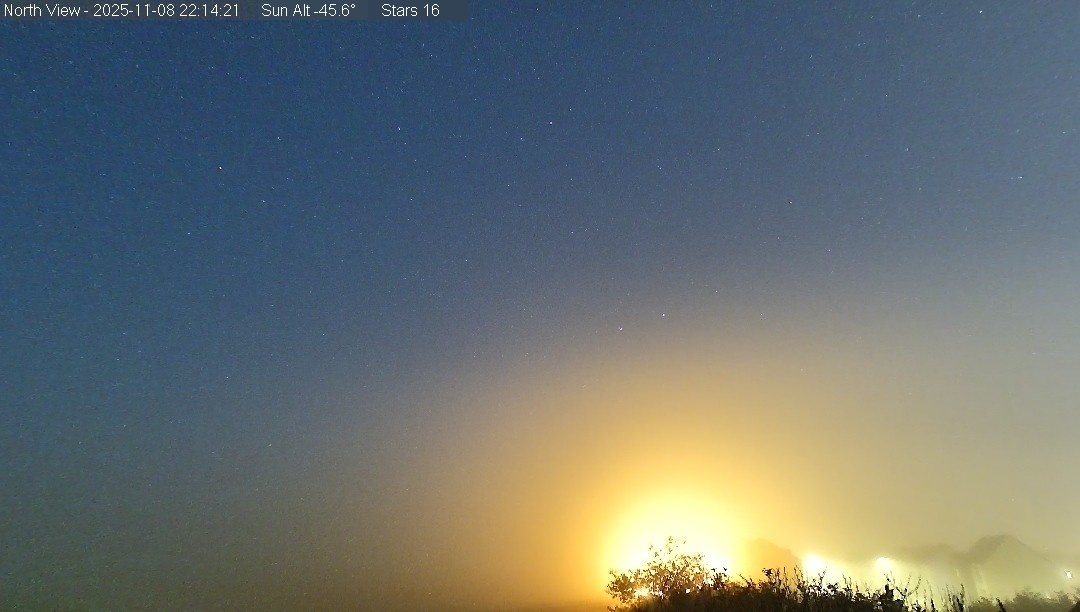
Fig 1b) The impact of the orange glow through the evening can be seen on the NorthCam Keogram below. At times the glow reaches up to 35° altitude.
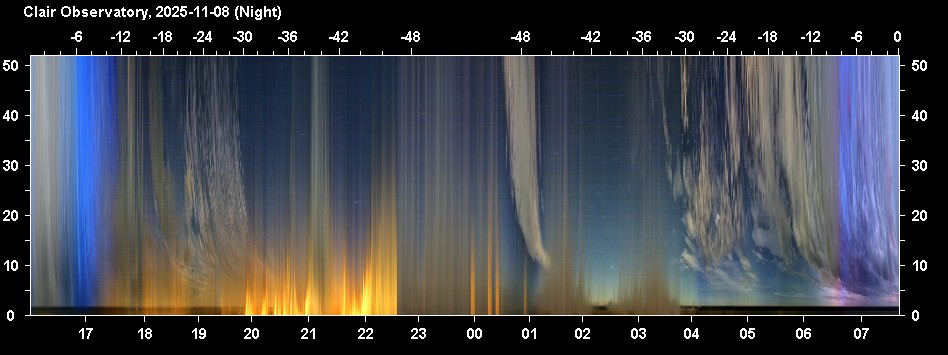
Fig 2. 16h Graphs showing OTA Temperature
Difference from Outside Dew Point (2025-11-07 / 2025-11-08)
Fig 2a. OTA Tube temperature is around the same value as the Outside Dew
point, even though the DewHeater Control was set to keep the OTA temperature
at 2°C above outside dew point, and the dew heater supposedly running at
100% power level.
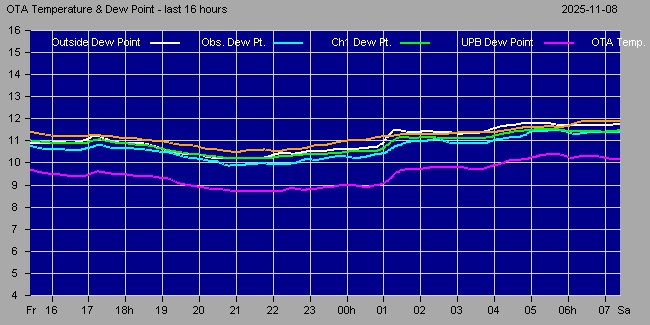
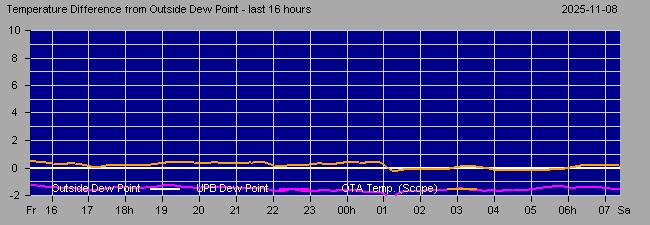
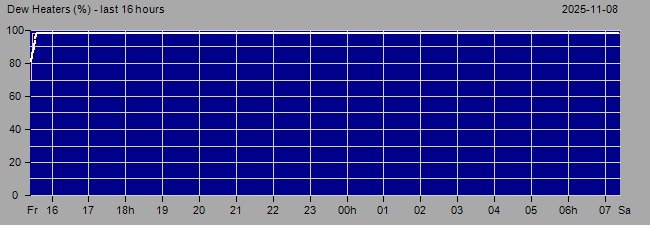
Fig 2b. After plugging the dew heater cable into the
correct output on the UPB v3 powerbox, the OTA Tube temperature
was then consistently held at 1 to 1.4°C above the outside dew point with
dew heater running at 10-50% power level (using DewHeaterControlOffset of
1).
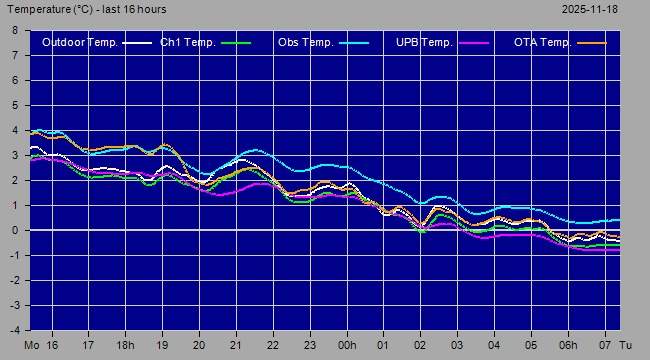
Fig 3. 16h Temperature
Graph showing consistently high Observatory Temperature values (2025-11-07 / 2025-11-08) .
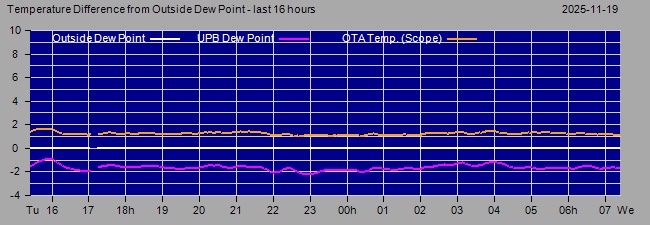
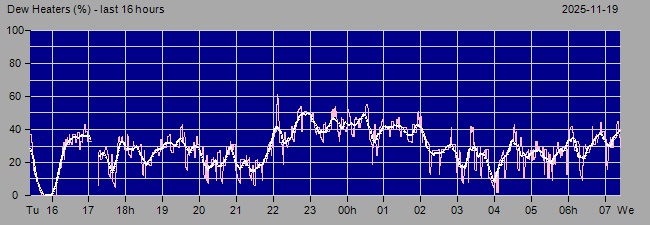
Fig 3a. The Observatory Temperature (cyan line) from sensor in
the Ekowitt Gateway Hub) is some 2 to 2.5°C higher than the UPB
Temperature (maurve line) from sensor in the UPB Powerbox on the LX200
Telescope and the two Outside Temperatures (white and green lines). 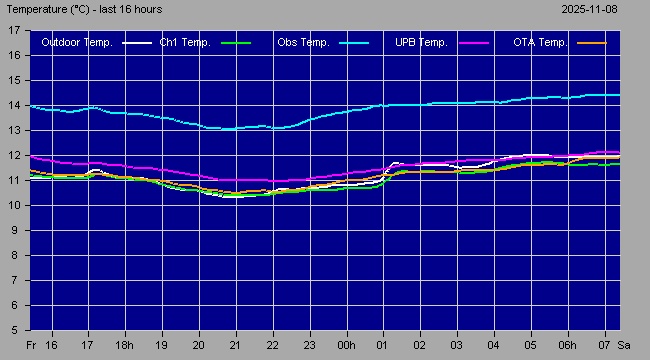
Fig 3b. After moving the Ekowitt Gateway Hub away from heat vents on the back of the AllSky/Weather Computer and to a better location the Observatory Temperature is now much more consistent with the UPB Temperature and outside temperatures (2025-11-18)
Fig 4. Night Summary Plot
showing data outages (2025-11-09)
- 19:42 CloudSensor data and NorthCam data stopped
- 19:47
Weather data (DPD & Wind) stopped
- 20:33 AllSky data stopped
- 20:42 All data resumed
again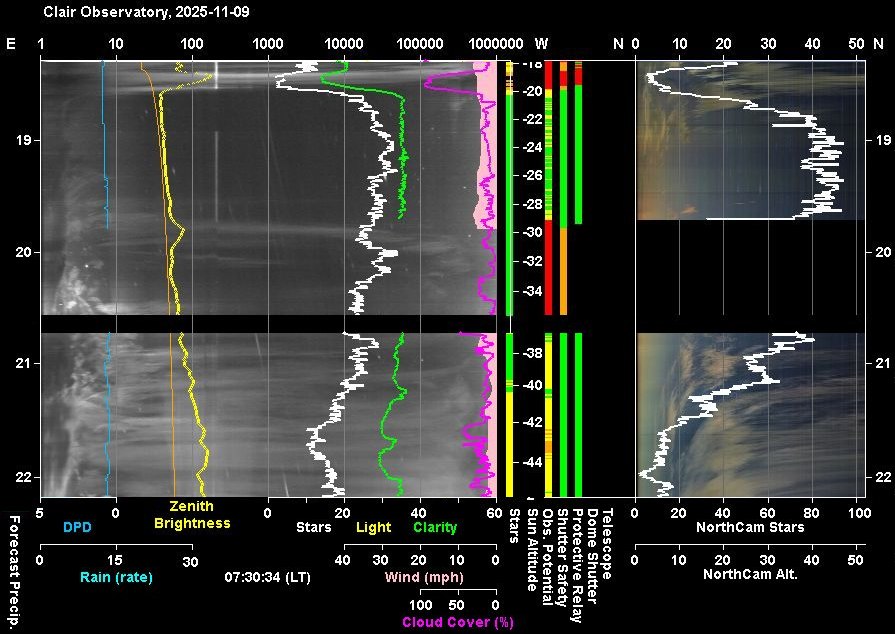
Back to Top Issue, Back to Top
1) Pegasus Unity Platform has been updated on Observatory Computer from 2.10
to 2.12 today (2025-11-09)
New features in version 2.12
(2.12.4822.576):
plus new Features from earlier version 2.11
2) Pegasus UPBv3 Firmware has been updated using Pegaus Unity Configuration
from 1.5 to 1.6 today (2025-11-09)
New features in firmware version 1.6:
Issues:
There were initial problems connecting to UPB
Powerbox Services
from AstroMain / Observatory : Switch (ASCOM.Device1.Switch) ,
ObservingConditions (ASCOM.Device1.ObservingConditions) and Focuser
(ASCOM.PegausAstroFocuser 1), but finally managed to get it working (it was
unclear what the problem was or what resolved).
Links
-
Pegasus Unity Platform
[ https://pegasusastro.com/unity-platform/ ]
-
Notes on Unity 2.13 (note made 2025-11-25)
Unity 2.13.30.30 has been released and whilst 2.13.25.25 is already
installed on Development Computer, it will most likely not be installed on
either the Observatory Computer or AllSky Computer based on its list of
fixes & new features, and given that Unity 3 will be released soon.
New features in version 2.13
(2.13.30.30):
Back to Top
Issue : Dew Heater Band on LX200 Telescope is suspected of not working.
Since the UPB v3 powerbox was installed in the Observatory in July 2025 to
replace the earlier UPB v1 box the OTA (telescope tube) temperature of the
LX200 has been noticed to more or less track the UPB Env. Temperature and doesn't seem to rise with
increased Dew Heater
Power. Even though Power is at 100% it doesn't seem to increase OTA Temp
above that of the UPB Env Temperature and doesn't increase it to the point
of being 2°C above the Outside
Dew Point. A set of example graphs are shown below:
Even though the telescope is sitting in the Dome Observatory and has a short
dew shield there must be a risk of the dew forming on the corrector lens on
the front of the LX200 when humidity is high as it has
been in last few days.
The possibility that the OTA
temperature was incorrect was ruled out, and a hypothesis was developed that
the UPV box might be limited to outputting a max 39% of potential power
(from 100/255 * 100 where 1st 100 is the supposed max power value in UPB v3
and 255 was the max power value in the UPB v1. This hypothesis was
ruled out by the Pegasus Astro Support team as the dew management system in
UPB v3 was built from the ground up and didn't descend from the system used
in UPB v1.
Although no notes were recorded my memory is that the heater band heating was manually checked on 2025-07-18 just after the UPB v3 box was recieved. The UPB's power consumption (current) increase when power setting was raised and showed some warming ( to touch) when dew heater was on. The possibility that the cable became dislodged after installation couldn't be dismissed.
Testing
Based on new assurance from Pegasus
Support Team about the dew heater implementation and the features of
the UPB v3 box (**) a series of tests were made to follow up the
observation that no power or not enough power is getting though to the dew
heater band on the observatory's LX200 telescope.
| Test | UPB Current | Conclusion | ||
| (total Amps) | ||||
| No Dew Heaters | 0.30A | Base load in 0.3A | ||
| Dew Heater Output 1 at 50% ("LX200") | 0.30A | LX200 dew heater is not connected to Dew Heater Output 1 | ||
| Dew Heater Output 1 at 100% ("LX200") | 0.30A | |||
| Dew Heater Output 2 at 50% ("TS80") | 0.60A | |||
| Dew Heater Output 2 at 100% ("TS80") | 0.90A | TS80 dew heater draws 0.6 A at 100% (full) power | ||
| Dew Heater Output 3 at 50% ("Unused") | 0.95A | LX200 dew heater must be connected to Dew Heater Output 3 | ||
| Dew Heater Output 3 at 100% ("Unused") | 1.60A | LX200 dew heater draws 1.3 A at 100% (full) power | ||
| Dew Heater Output 2 & 3 at 100% | 2.20A | LX200 & TS80 dew heaters together draw 1.9 A at 100% (full) power |
||
The tests established that the LX200's dew heater cable was evidentally plugged into Dew Heater Output 3 (C) and not Output 1 (A) as intended. Examination of dew heater cabling subsequently confirmed this
So basically the issue is entirely due to user error.
**
each of the 3 dew heater outputs on the UPB v3 box has its
own dedicated MOSFET capable of supplying up to 3 Amps whilst on the UPB v1
box, the 2 dew heater outputs were managed by a single MOSFET which could
deliver up to 6 Amps combined
Analysis
An analysis was performed to understand why the error had been made
It was planned that LX200 dew heater would be fed from Output 1
(Output A), and that the TS80 guidescope dew heater would be fed from Output
2 (Output B), whilst Output 3 (Output C) would be empty for the time being;
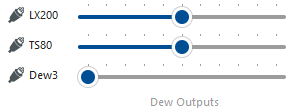
When performing initial testing after the arrival of the UPB v3 box back
in July, the cable to the LX200's dew heater band was connected to the
UPB v3's left hand output (Output A, Dew
Heater 1) as planned and it correctly drew current when its power output was
set 50-100% and the heater band would become warm. The cable
to the guidescope's dew heater band (TS80) was connected to the middle
output (Output B, Dew Heater 2) and this also operated okay (drawing current
and becoming warm).
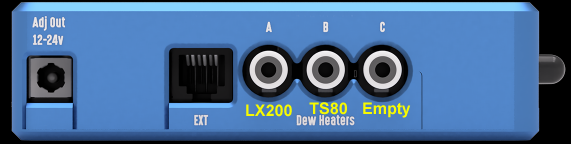
When it came to the installation of the UPB box onto the Observatory's 12" LX200 telescope I was able to utilise the VESA style screw holes on the UPB box and using longer bolts than those supplied I attached the power box to the telescope's right hand fork, where it would be most optimally placed, serving both camera / focuser equipment, dew heaters and the power to LX200 itself.
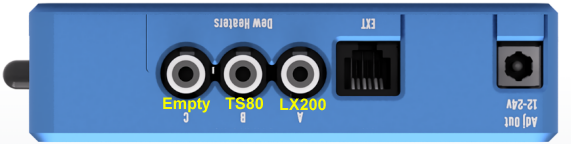
To do this the UPB powerbox had to be inverted (so to speak) as illustrated below. Then during hookup of the cables and knowing everything was fine during initial testing, the cable for the LX200 heater bands was again plugged into the left hand output with guidescope heater band plugged into the middle output.
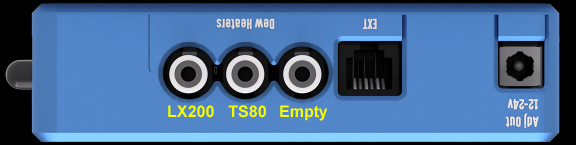
This was a geometric mistake but with small output names on the box (A, B,C) being less visible in this orientation, being partially hidden by the dew heater cables and other cabling and also being upside down, there was nothing drawing me to the spot the error.
It didn't occur to me that I had the LX200 dew heater cable plugged into Output C (Dew Heater 3) until today (2025-11-10) when the power consumption (current) of UPB was examined when raising the output power on each of the 3 outputs independently. This showed that there was no extra current draw when raising Dew Heater 1 (that was meant to be for the LX200 dew heater), but there was a significant extra current draw when raising power on Dew Heater 3 which was supposedly unused.
Checking the outputs /cables confirmed the error and I swapped the cable for the LX200 dew heater from Output C to Output A thereby fixing the issue. The UPB Current Graph showed that the LX200 dew heater draws 1.3 A of current when on 100% (max) power, whilst the guidescope dew heater draws 0.6 A when on 100% power.
Solution
The LX200 dew heater cabled was unplugged from Output 3 (C) and plugged into
Output 1 (A)
The corrected cable configuration is shown below.
Links
- UPB
v3 Product Page
(https://pegasusastro.com/products/ultimate-powerbox-v3/)
-
UPB v3 Manual
(https://pegasusastro.com/wp-content/uploads/2024/01/UPBv3-manual.pdf)
Back to Top
| This Web Page: | Notes - Session 1373 (2025-11-08) |
| Last Updated : | 2026-01-24 |
| Site Owner : | David Richards |
| Home Page : | David's Astronomy Web Site |
