David's Astronomy Pages
Notes - Session 1392 (2026-01-15)

Notes
(S1391)

Notes
Main
Home
Page

Notes
(S1393)
David's Astronomy Pages
|
Notes (S1391) |
Notes Main |
Home Page |
Notes (S1393) |
Main aims
Equipment & Software
Highlights
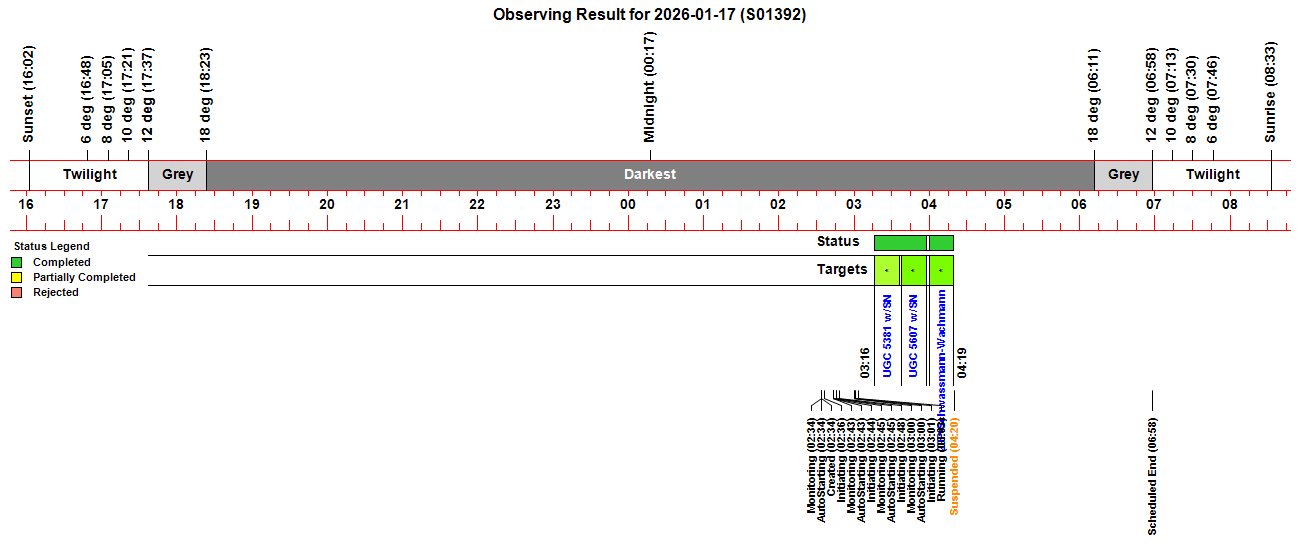
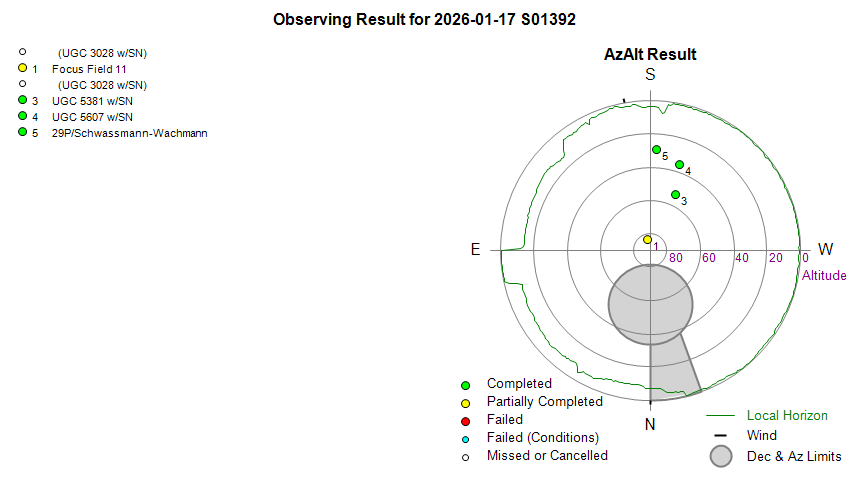
 Targets. 3/13 planned targets were completed. 1 target
failed due to missed start due to problems initiating session, other targets
not run due to frozen Job Queue/frozen ObsManager.
Targets. 3/13 planned targets were completed. 1 target
failed due to missed start due to problems initiating session, other targets
not run due to frozen Job Queue/frozen ObsManager. AstroMain. AstroMain 3.80.4 had a showstopping issue that prevented
the session was progressing from initiating to starting. AstroMain was
restarted with 3.80.2 (used during previous S1391 session), but this has a
major flaw that saw ObsManager going into an infinite loop at the start of
suspended state that was detected as ObsManager freezing (not cycling). Due
to rollback to 3.80.2 version there wasn't sufficient opportunity to fully
test the new ObsManager MainLoop.
StateMachine. The operational requirement to suspend the session
due to deteriorating sky condition/SoftSuspend exposed a major flaw in the
new Session StateMachine. The shutter was closed ok during Suspending state,
but the ObsManager hung, when the new StateMachine went into an infinite
loop at the start of suspended state.
ObsManager. Due to problems progressing beyond the Plan Load when
using AstroMain 3.80.4 and revert back to AstroMain 3.80.2, the newly
refactored ObsManager received only limited testing, but was enough to
demostrate that there were no serious issues beyond the stalled progression,
which is not directly connected to new features.
AstroMain. AstroMain 3.80.4 had a showstopping issue that prevented
the session was progressing from initiating to starting. AstroMain was
restarted with 3.80.2 (used during previous S1391 session), but this has a
major flaw that saw ObsManager going into an infinite loop at the start of
suspended state that was detected as ObsManager freezing (not cycling). Due
to rollback to 3.80.2 version there wasn't sufficient opportunity to fully
test the new ObsManager MainLoop.
StateMachine. The operational requirement to suspend the session
due to deteriorating sky condition/SoftSuspend exposed a major flaw in the
new Session StateMachine. The shutter was closed ok during Suspending state,
but the ObsManager hung, when the new StateMachine went into an infinite
loop at the start of suspended state.
ObsManager. Due to problems progressing beyond the Plan Load when
using AstroMain 3.80.4 and revert back to AstroMain 3.80.2, the newly
refactored ObsManager received only limited testing, but was enough to
demostrate that there were no serious issues beyond the stalled progression,
which is not directly connected to new features. ObsOverseer. The ObsOverseer worked as per design and intervened o issues
CCD Camera. No issues Dome.
No issues open/closing shutter. Dome was
successfully parked at the end of the session.
ObsOverseer. The ObsOverseer worked as per design and intervened o issues
CCD Camera. No issues Dome.
No issues open/closing shutter. Dome was
successfully parked at the end of the session.Summary Plots & Logs
Observing Plan 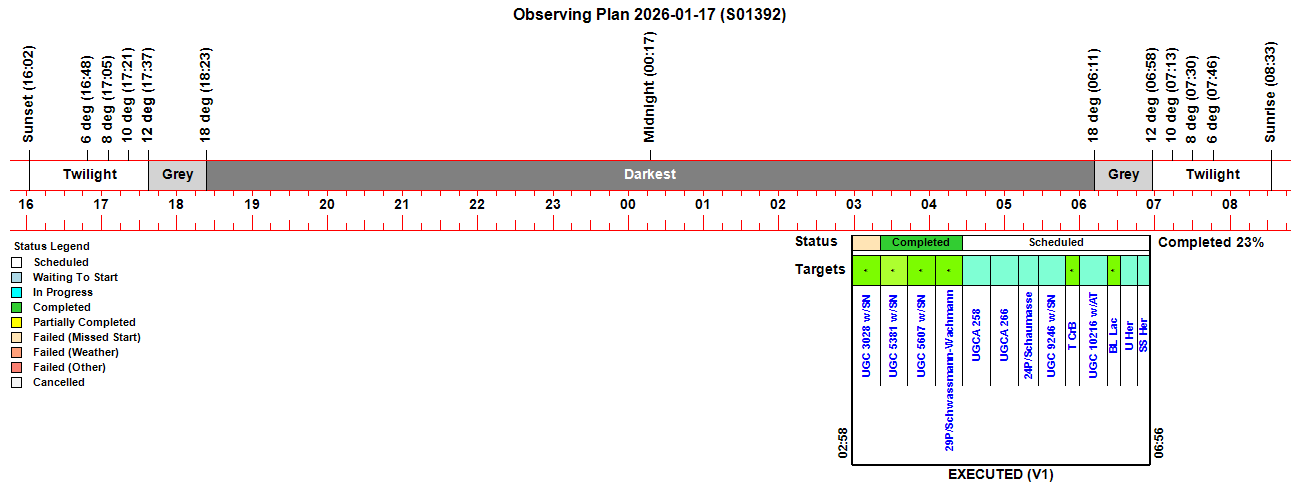 |
||||||||||||||||||||||||||||||||||||||||||||||||||||||||||||||||||||||||||||||||||||||||||||||||||||||||||||||||||||||||||||||||||||||||||||||||||||||||||||||||||||||||||||||||||||||||||||||||||||||||||||||||||||||||||||||||||||||||||||||||||||||||||||||||||||||||||||||||||||||||||||||||||||||||||||||||||||||||||||||||||||||||||||||||||||||||||||||||||||||||||||||||||||||||
|
Observing Result |
||||||||||||||||||||||||||||||||||||||||||||||||||||||||||||||||||||||||||||||||||||||||||||||||||||||||||||||||||||||||||||||||||||||||||||||||||||||||||||||||||||||||||||||||||||||||||||||||||||||||||||||||||||||||||||||||||||||||||||||||||||||||||||||||||||||||||||||||||||||||||||||||||||||||||||||||||||||||||||||||||||||||||||||||||||||||||||||||||||||||||||||||||||||||
 |
||||||||||||||||||||||||||||||||||||||||||||||||||||||||||||||||||||||||||||||||||||||||||||||||||||||||||||||||||||||||||||||||||||||||||||||||||||||||||||||||||||||||||||||||||||||||||||||||||||||||||||||||||||||||||||||||||||||||||||||||||||||||||||||||||||||||||||||||||||||||||||||||||||||||||||||||||||||||||||||||||||||||||||||||||||||||||||||||||||||||||||||||||||||||
 |
||||||||||||||||||||||||||||||||||||||||||||||||||||||||||||||||||||||||||||||||||||||||||||||||||||||||||||||||||||||||||||||||||||||||||||||||||||||||||||||||||||||||||||||||||||||||||||||||||||||||||||||||||||||||||||||||||||||||||||||||||||||||||||||||||||||||||||||||||||||||||||||||||||||||||||||||||||||||||||||||||||||||||||||||||||||||||||||||||||||||||||||||||||||||
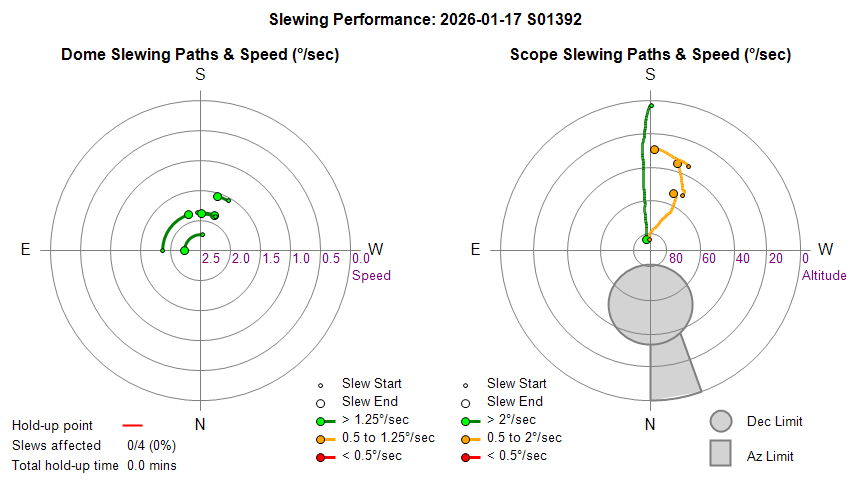
| Dome & Scope Slewing Performance | ||||||||||||||||||||||||||||||||||||||||||||||||||||||||||||||||||||||||||||||||||||||||||||||||||||||||||||||||||||||||||||||||||||||||||||||||||||||||||||||||||||||||||||||||||||||||||||||||||||||||||||||||||||||||||||||||||||||||||||||||||||||||||||||||||||||||||||||||||||||||||||||||||||||||||||||||||||||||||||||||||||||||||||||||||||||||||||||||||||||||||||||||||||||||
 |
||||||||||||||||||||||||||||||||||||||||||||||||||||||||||||||||||||||||||||||||||||||||||||||||||||||||||||||||||||||||||||||||||||||||||||||||||||||||||||||||||||||||||||||||||||||||||||||||||||||||||||||||||||||||||||||||||||||||||||||||||||||||||||||||||||||||||||||||||||||||||||||||||||||||||||||||||||||||||||||||||||||||||||||||||||||||||||||||||||||||||||||||||||||||
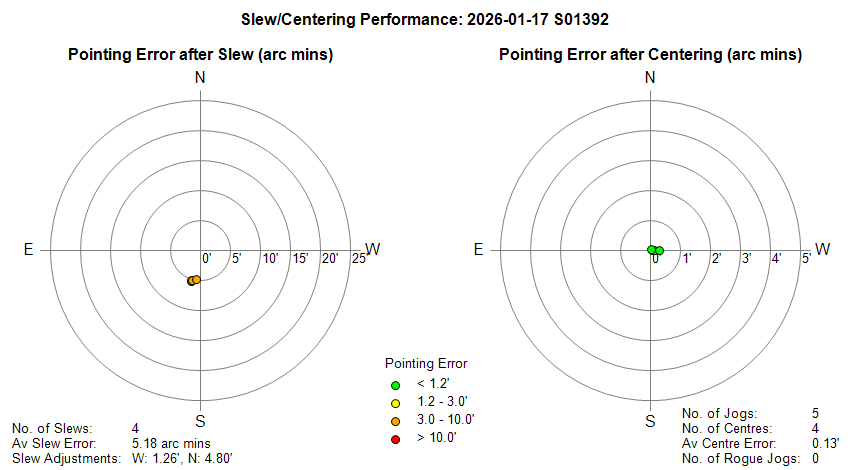
| Slew/Centering Performance | ||||||||||||||||||||||||||||||||||||||||||||||||||||||||||||||||||||||||||||||||||||||||||||||||||||||||||||||||||||||||||||||||||||||||||||||||||||||||||||||||||||||||||||||||||||||||||||||||||||||||||||||||||||||||||||||||||||||||||||||||||||||||||||||||||||||||||||||||||||||||||||||||||||||||||||||||||||||||||||||||||||||||||||||||||||||||||||||||||||||||||||||||||||||||
 |
||||||||||||||||||||||||||||||||||||||||||||||||||||||||||||||||||||||||||||||||||||||||||||||||||||||||||||||||||||||||||||||||||||||||||||||||||||||||||||||||||||||||||||||||||||||||||||||||||||||||||||||||||||||||||||||||||||||||||||||||||||||||||||||||||||||||||||||||||||||||||||||||||||||||||||||||||||||||||||||||||||||||||||||||||||||||||||||||||||||||||||||||||||||||
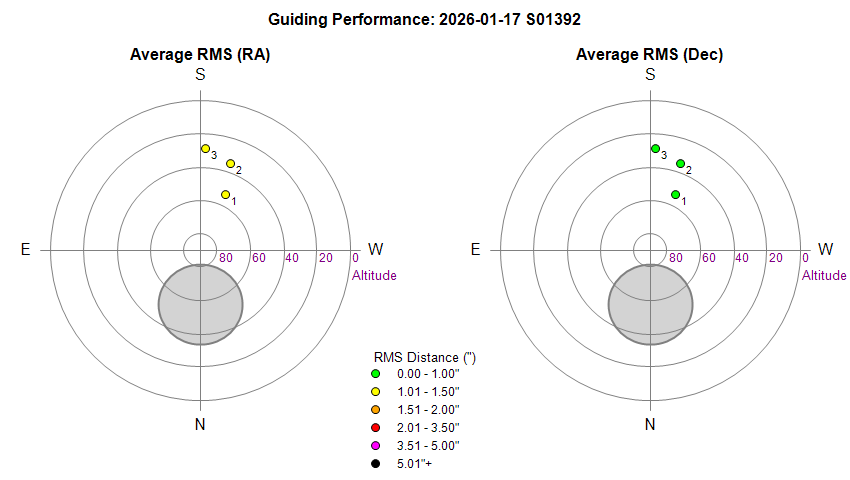
| Guiding Performance | ||||||||||||||||||||||||||||||||||||||||||||||||||||||||||||||||||||||||||||||||||||||||||||||||||||||||||||||||||||||||||||||||||||||||||||||||||||||||||||||||||||||||||||||||||||||||||||||||||||||||||||||||||||||||||||||||||||||||||||||||||||||||||||||||||||||||||||||||||||||||||||||||||||||||||||||||||||||||||||||||||||||||||||||||||||||||||||||||||||||||||||||||||||||||
 |
||||||||||||||||||||||||||||||||||||||||||||||||||||||||||||||||||||||||||||||||||||||||||||||||||||||||||||||||||||||||||||||||||||||||||||||||||||||||||||||||||||||||||||||||||||||||||||||||||||||||||||||||||||||||||||||||||||||||||||||||||||||||||||||||||||||||||||||||||||||||||||||||||||||||||||||||||||||||||||||||||||||||||||||||||||||||||||||||||||||||||||||||||||||||
| Sky Conditions (Locate Frames) | ||||||||||||||||||||||||||||||||||||||||||||||||||||||||||||||||||||||||||||||||||||||||||||||||||||||||||||||||||||||||||||||||||||||||||||||||||||||||||||||||||||||||||||||||||||||||||||||||||||||||||||||||||||||||||||||||||||||||||||||||||||||||||||||||||||||||||||||||||||||||||||||||||||||||||||||||||||||||||||||||||||||||||||||||||||||||||||||||||||||||||||||||||||||||
 |
||||||||||||||||||||||||||||||||||||||||||||||||||||||||||||||||||||||||||||||||||||||||||||||||||||||||||||||||||||||||||||||||||||||||||||||||||||||||||||||||||||||||||||||||||||||||||||||||||||||||||||||||||||||||||||||||||||||||||||||||||||||||||||||||||||||||||||||||||||||||||||||||||||||||||||||||||||||||||||||||||||||||||||||||||||||||||||||||||||||||||||||||||||||||
|
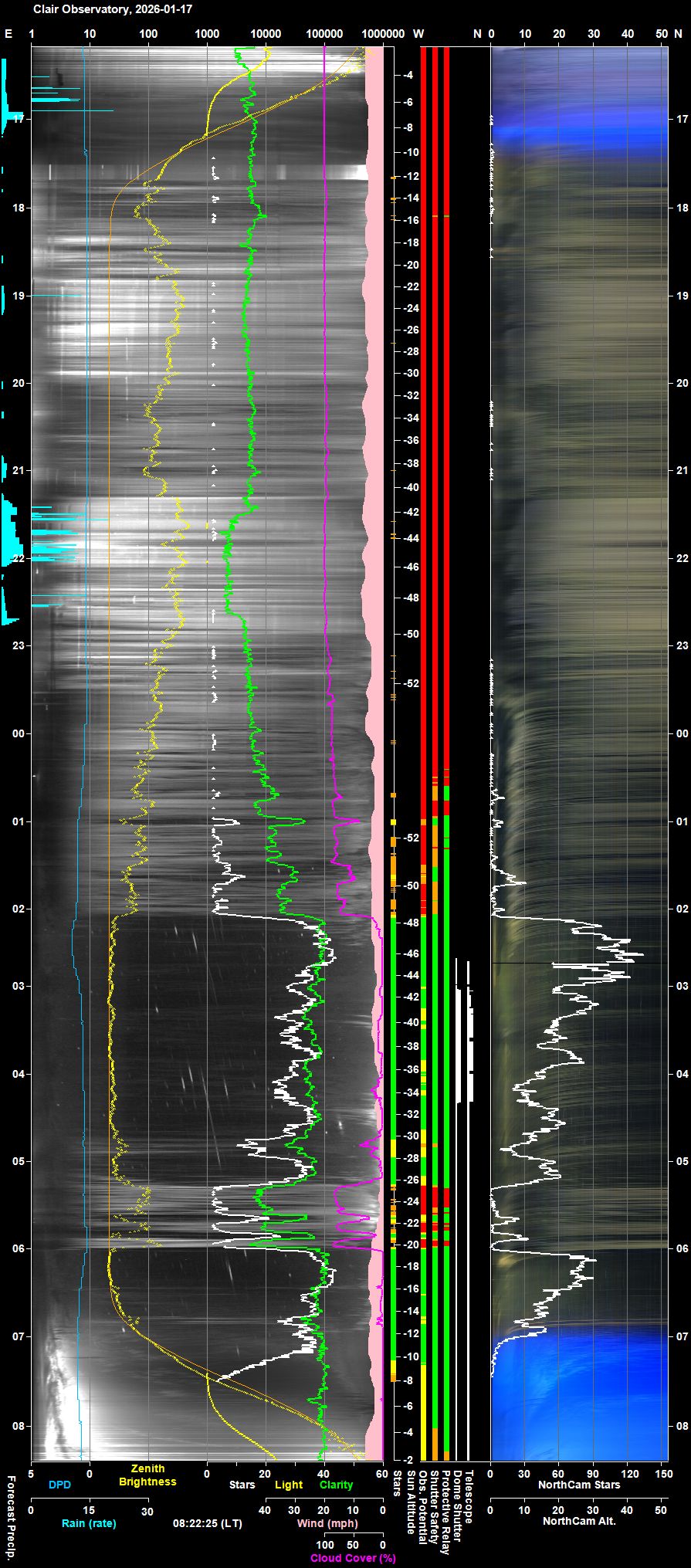
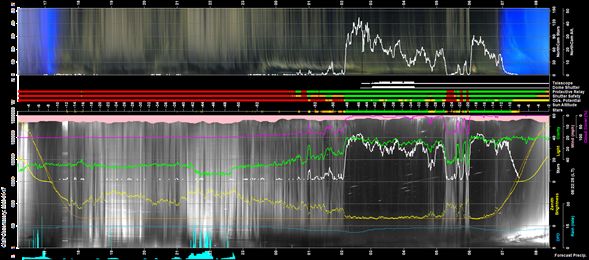
Night Sky Summary Plot Top axis: Sky Brightness at Zenith (in ADU/s) Lefthand axis: Local Time (hh LT). Righthand axis: Sun Altitude (degs) Note: The NorthCam Star Count line is unreliable and should be ignored (The AstroNorthCam 'Find' Star method is producing many false positives from clouds) |
||||||||||||||||||||||||||||||||||||||||||||||||||||||||||||||||||||||||||||||||||||||||||||||||||||||||||||||||||||||||||||||||||||||||||||||||||||||||||||||||||||||||||||||||||||||||||||||||||||||||||||||||||||||||||||||||||||||||||||||||||||||||||||||||||||||||||||||||||||||||||||||||||||||||||||||||||||||||||||||||||||||||||||||||||||||||||||||||||||||||||||||||||||||||
 |
||||||||||||||||||||||||||||||||||||||||||||||||||||||||||||||||||||||||||||||||||||||||||||||||||||||||||||||||||||||||||||||||||||||||||||||||||||||||||||||||||||||||||||||||||||||||||||||||||||||||||||||||||||||||||||||||||||||||||||||||||||||||||||||||||||||||||||||||||||||||||||||||||||||||||||||||||||||||||||||||||||||||||||||||||||||||||||||||||||||||||||||||||||||||
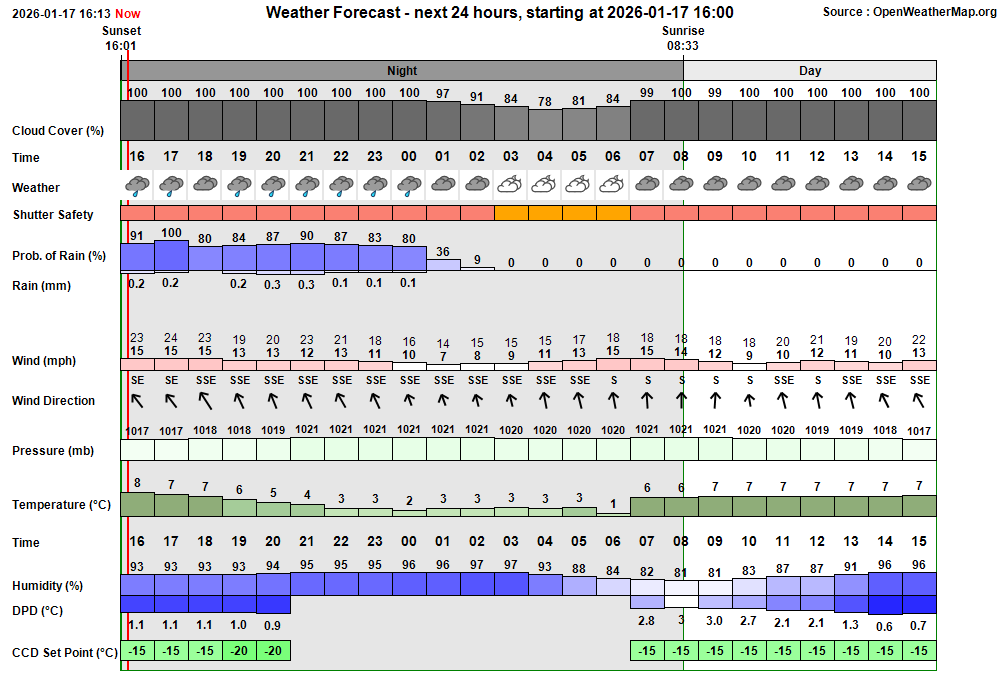
| Actual Weather vs Pre-Session Weather Forecast | ||||||||||||||||||||||||||||||||||||||||||||||||||||||||||||||||||||||||||||||||||||||||||||||||||||||||||||||||||||||||||||||||||||||||||||||||||||||||||||||||||||||||||||||||||||||||||||||||||||||||||||||||||||||||||||||||||||||||||||||||||||||||||||||||||||||||||||||||||||||||||||||||||||||||||||||||||||||||||||||||||||||||||||||||||||||||||||||||||||||||||||||||||||||||
 |
||||||||||||||||||||||||||||||||||||||||||||||||||||||||||||||||||||||||||||||||||||||||||||||||||||||||||||||||||||||||||||||||||||||||||||||||||||||||||||||||||||||||||||||||||||||||||||||||||||||||||||||||||||||||||||||||||||||||||||||||||||||||||||||||||||||||||||||||||||||||||||||||||||||||||||||||||||||||||||||||||||||||||||||||||||||||||||||||||||||||||||||||||||||||
 |
||||||||||||||||||||||||||||||||||||||||||||||||||||||||||||||||||||||||||||||||||||||||||||||||||||||||||||||||||||||||||||||||||||||||||||||||||||||||||||||||||||||||||||||||||||||||||||||||||||||||||||||||||||||||||||||||||||||||||||||||||||||||||||||||||||||||||||||||||||||||||||||||||||||||||||||||||||||||||||||||||||||||||||||||||||||||||||||||||||||||||||||||||||||||
| Session Event Log | ||||||||||||||||||||||||||||||||||||||||||||||||||||||||||||||||||||||||||||||||||||||||||||||||||||||||||||||||||||||||||||||||||||||||||||||||||||||||||||||||||||||||||||||||||||||||||||||||||||||||||||||||||||||||||||||||||||||||||||||||||||||||||||||||||||||||||||||||||||||||||||||||||||||||||||||||||||||||||||||||||||||||||||||||||||||||||||||||||||||||||||||||||||||||
|
||||||||||||||||||||||||||||||||||||||||||||||||||||||||||||||||||||||||||||||||||||||||||||||||||||||||||||||||||||||||||||||||||||||||||||||||||||||||||||||||||||||||||||||||||||||||||||||||||||||||||||||||||||||||||||||||||||||||||||||||||||||||||||||||||||||||||||||||||||||||||||||||||||||||||||||||||||||||||||||||||||||||||||||||||||||||||||||||||||||||||||||||||||||||
| Session Alerts & Alarms | ||||||||||||||||||||||||||||||||||||||||||||||||||||||||||||||||||||||||||||||||||||||||||||||||||||||||||||||||||||||||||||||||||||||||||||||||||||||||||||||||||||||||||||||||||||||||||||||||||||||||||||||||||||||||||||||||||||||||||||||||||||||||||||||||||||||||||||||||||||||||||||||||||||||||||||||||||||||||||||||||||||||||||||||||||||||||||||||||||||||||||||||||||||||||
|
||||||||||||||||||||||||||||||||||||||||||||||||||||||||||||||||||||||||||||||||||||||||||||||||||||||||||||||||||||||||||||||||||||||||||||||||||||||||||||||||||||||||||||||||||||||||||||||||||||||||||||||||||||||||||||||||||||||||||||||||||||||||||||||||||||||||||||||||||||||||||||||||||||||||||||||||||||||||||||||||||||||||||||||||||||||||||||||||||||||||||||||||||||||||
Back to Top
	Const MaxAllowedSizeBytes As Long = 524288000
   If
LogFile.BaseStream.Length > MaxAllowedSizeBytes Then Exit Sub Resolved post session 2026-01-18 (Observatory Computer,
AstroMain )
Closed 2026-02-13 (Observatory Computer,
AstroMain )
Resolved post session 2026-01-18 (Observatory Computer,
AstroMain )
Closed 2026-02-13 (Observatory Computer,
AstroMain ) Select Case InitiatingStageNo
Case 1 : result = handleInitiatingStage1() ' (Connect Camera)
Case 2 : result = handleInitiatingStage2() ' (Wait on Camera Connection)
Case 3 : result = handleInitiatingStage3() ' (Create/Get Plan)
Case 5 : result = handleInitiatingStage4() ' (Create Live/Test Session)
Case 5 : result = handleInitiatingStage5() ' (Wait on New Session)
Case Else
Exit Sub
End Select
	Select Case InitiatingStageNo
     Case 1 : result =
	handleInitiatingStage1() ' (Connect Camera)
     Case
	2 : result = handleInitiatingStage2() ' (Wait on Camera Connection)

	Case 3 : result = handleInitiatingStage3() ' (Create/Get Plan)

	Case 4 : result = handleInitiatingStage4() ' (Create Live/Test Session)

	Case 5 : result = handleInitiatingStage5() ' (Wait on New Session)

	Case Else

	WriteLogFileRecord("Initiating", "Alert", "(error)", "handleInitiating",

	"Unexpected InitiatingStageNo=" & CStr(InitiatingStageNo))

	Exit Sub
   End Select
Fixed 2026-01-18 (AstroMain 3.80.5)
Fixed 2026-01-18 (AstroMain 3.80.5)
Select Case SuspendingStageNo Select Case SuspendedStageNo
Fixed 2026-01-18 (AstroMain 3.80.5)
Fixed 2026-01-18 (AstroMain 3.80.5)
Fixed 2026-01-18 (AstroMain 3.80.5)
Resolved 2026-01-28 (AllSky/Weather Computer,
Windows 11)
Resolved 2026-01-29 (AllSky/Weather Computer, Pegasus
Unity, Pegasus UCH) 23:07:18.22 | Suspended (Manager) Start SuspendedStage 11 Info | Suspended Stage 11 (Monitor Weather Conditions) 23:07:18.34 | Suspended trace) Telescope.Connect (trace) | [ ExecuteQueue() CheckScope ] 23:07:19.47 | Suspended (trace) Continue (trace) | [ ExecuteQueue() Continue ] 23:07:19.48 | Suspended (trace) TargetLoop (trace) | [ ExecuteQueue() TargetLoop ] 23:07:19.49 | C/2022 E2 (ATLAS) Load FocusFields Try | Loading Focus Fields from FocusFields.txt 23:07:19.61 | C/2022 E2 (ATLAS) Load FocusFields Ok | 24 Focus Fields loaded 23:07:19.91 | C/2022 E2 (ATLAS) Select FocusField Info | Choosing Focus Field 5 (LHA 2.0, Alt 69.6) 23:07:19.91 | C/2022 E2 (ATLAS) (trace) TargetLoop (trace) | [ ExecuteQueue() TargetLoop ] 23:07:20.06 | M31 w/AT2025agmm Select FocusField Info | Choosing Focus Field 5 (LHA 2.0, Alt 69.6) 23:07:20.06 | M31 w/AT2025agmm (trace) TargetLoop (trace) | [ ExecuteQueue() TargetLoop ] 23:07:20.17 | GCVS RX And Select FocusField Info | Choosing Focus Field 5 (LHA 2.0, Alt 69.6) 23:07:20.17 | GCVS RX And (trace) TargetLoop (trace) | [ ExecuteQueue() TargetLoop ] 23:07:20.26 | GCVS SS Cyg Select FocusField Info | Choosing Focus Field 5 (LHA 2.0, Alt 69.6) 23:07:20.26 | GCVS SS Cyg (trace) TargetLoop (trace) | [ ExecuteQueue() TargetLoop ] 23:07:20.37 | GCVS BL Lac Select FocusField Info | Choosing Focus Field 5 (LHA 2.0, Alt 69.6) 23:07:20.37 | GCVS BL Lac (trace) TargetLoop (trace) | [ ExecuteQueue() TargetLoop ]Two code sections in ExecuteQueue that update TPN Targets call GetBestFocusField() which Chooses and logs Focus Field number and LHA/Alt location. AstroMain 3.80.5
Fixed 2026-01-22 (AstroMain 3.80.5)
Fixed 2026-01-30 (AstroMain AstroMain 3.80.6)
Fixed 2026-01-30 (AstroMain 3.80.6)
Fixed 2026-02-05 (AstroMain 3.80.9)
Fixed 2026-02-05 (AstroMain 3.80.9) <style>
u { text-decoration: underline; text-decoration-skip-ink: none; }
</style>
Closed 2026-02-08 (AstroMain 3.80.9)
Fix attempted 2026-02-09 (AstroMain 3.80.10) ' Guard
Rail to stop runaway logging (file size limited to 500 MB )
' ---------------------------------------------------------------
Const MaxAllowedSizeBytes As Long = 524288000
If
LogFile.BaseStream.Length > MaxAllowedSizeBytes Then Exit Sub
Done
2026-01-18 (AstroMain 3.80.5)
Public OverrideManager As New StateOverrideManager
OverrideManager.RequestManualMode = True
		If OverrideManager.RequestManualMode Then

		EnterManual()

		OverrideManager.RequestManualMode = False
    End If
OverrideManager.RequestForceState(SessionState.Suspending)
		If OverrideManager.RequestForceState.HasValue Then

		Dim target = OverrideManager.RequestForceState.Value

		EnterStateRoutineFor(target) ' <— Calls EnterStarting, EnterRunning,
		etc.
      OverrideManager.RequestForceState
		= Nothing
  End If
Done 2026-01-18 (AstroMain 3.80.5)
Done 2026-01-20 (AstroMain 3.80.5)
Done 2026-01-20 (AstroMain 3.80.5)
Done 2026-01-20 (AstroMain 3.80.5)
Done 2026-01-24 (AstroMain 3.80.5)
Done 2026-02-01 (AstroMove 1.17.5, AstroLaunch
1.14.7)
Done 2026-01-27 (AstroMain 3.80.5)
Done 2026-01-29 (AstroMain 3.80.6)
Done 2026-02-01 (AstroMain 3.80.6)
Done 2026-02-01 (AstroMain 3.80.7)
Done 2026-02-02 (AstroMain 3.80.7)
Done 2026-02-03 (AstroMain 3.80.7)
Done 2026-02-03 (AstroMain 3.80.7) <style>
u { text-decoration: underline;
text-decoration-skip-ink: none; }
</style>
Done
2026-02-05 (AstroMain 3.80.9)
Done
2026-02-11 (AstroMain 3.80.13)
Done
2026-02-12 (AstroLaunch 1.14.8)
Done
2026-02-12 (Unity3, AllSky/Weather Computer)
Done
2026-02-12 (AstroMain 3.80.14, AstroGuard 1.13.1, AstroAllSky 3.27.1)
Done 2026-02-05 (AstroMain 3.80.8)  To do 2026-02-05 (AstroMain 3.80.9)
  To Do 2026-01-20 (AstroMain 3.80.5)
  To investigate and prototype 2026-02-01+ (AstroProbe)
Back to Top Issue, Back to Top
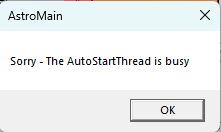
Fig 1.
'The AutoStartThread is Busy' dialog
AstroMain has started to become prone to dialogs appearing
during AutoStart / Pending which blocks ObsManager execution until
dismissed by user. Block of ObsManager is not acceptable, and issue
needs to be fixed
Back to Top Issue, Back to Top
FetchPlanInBackground()
        │
        ▼
   [Thread Start]
        │
        ▼
   SelectPlan()
        │
        ├── SelectPlanFromDatabase()
        │         │
        │         └── GetPlansForNight()
        │
        ├── If no plan:
        │        │
        │        ├── InitiateNewPlan()
        │        │        └── SendAstroPlanMessage()
        │        │
        │        └── Wait for bNewPlanIsReady
        │
        └── SelectedPlan found
                │
                ▼
            LoadPlan()
                │
                ├── LoadPlanFromDatabaseInBackground()
                │         │
                │         └── [Thread Start]
                │                   │
                │                   ▼
                │         LoadPlanFromDatabase()
                │                   │
                │                   ├── RetrievePlan()
                │                   ├── Build TIS
                │                   ├── Compute timings
                │                   ├── Update UI
                │                   └── PlanStatus = Loaded/Failed
                │
                └── Wait for PlanStatus
                        │
                        └── Copy charts
Back to Top
During this development cycle, the Observatory Control System underwent a structural refactoring of its Services module. The goal was to preserve all existing behaviour while improving clarity, maintainability, and long-term architectural stability. No functional changes were introduced; instead, the focus was on reorganising and renaming components to reflect their true responsibilities.
The system now distinguishes between three conceptual categories:
Lifecycle routines now follow a consistent naming scheme:
StartScopeConnection()StopScopeConnection()
StartTempMonitor()StopTempMonitor()
StartTelePositionService()StopTelePositionService()
The StartObservatoryServices() and StopObservatoryServices() routines now read like clear operational scripts.
Each line expresses a single, intention-revealing action.
All refactoring was performed with strict behavioural fidelity. No operational logic or device behaviour was changed.
The TelePosition subsystem requires deeper lifecycle analysis and will be addressed separately
StartObservatoryServices()
    ├── StartOverseerService()
    ├── StartCloudSensorService()
    ├── StartWeatherStationService()
    ├── StartObservatoryManager()
    ├── StartScorecardReceiver()
    ├── StartAllSkyStarMonitor()
    ├── StartTelePositionService()
    ├── StartObsEnvService()
    ├── StartPulsarDomeMonitor()
    ├── StartDomeConnection()
    ├── StartScopeConnection()
    ├── StartPHD2Connection()
    ├── StartSharpCapConnection()
    ├── StartObsMonitor()
    ├── StartPowerMonitor()
    ├── StartTheSkyScopeMonitor()
    ├── StartFocuser1Connection()
    ├── StartTempMonitor()
    ├── StartCcdCameraConnection()
    ├── StartCcdMonitor()
    ├── StartNetworkMonitor()
    ├── StartUpsMonitor()
    ├── StartZigbeeConnection()
    ├── StartPowerBoxConnection()
    └── StartCamera2Connection()
StartNightObservatoryServices()
    ├── StartScopeConnection()
    ├── StartPHD2Connection()
    ├── StartCamera2Connection()
    └── StartSharpCapConnection()
StopObservatoryServices()
    ├── StopOverseerService()
    ├── StopCloudSensorService()
    ├── StopWeatherStationService()
    ├── StopObservatoryManager()
    ├── StopScorecardReceiver()
    ├── StopAllSkyStarMonitor()
    ├── StopTelePositionService()
    ├── StopObsEnvService()
    ├── StopPulsarDomeMonitor()
    ├── StopDomeConnection()
    ├── StopScopeConnection()
    ├── StopPHD2Connection()
    ├── StopSharpCapConnection()
    ├── StopObsMonitor()
    ├── StopPowerMonitor()
    ├── StopTheSkyScopeMonitor()
    ├── StopFocuser1Connection()
    ├── StopTempMonitor()
    ├── StopCcdCameraConnection()
    ├── StopCcdMonitor()
    ├── StopNetworkMonitor()
    ├── StopUpsMonitor()
    ├── StopZigbeeConnection()
    ├── StopPowerBoxConnection()
    └── StopCamera2Connection()
StopNightObservatoryServices()
    ├── StopScopeConnection()
    ├── StopPHD2Connection()
    ├── StopCamera2Connection()
    └── StopSharpCapConnection()
Back to TTop
The Monitors Module had grown organically over many years, accumulating complexity, implicit behaviour, and tightly coupled logic. The goal of the refactor was to create a unified, intention-revealing architecture that:
This report summarises the architectural principles developed during the refactor and the key concepts that now underpin the new monitoring framework.
The original Monitors Module contained large, multi-responsibility blocks of code with intertwined timing, health, and domain logic. This made reasoning about behaviour difficult and increased the risk of unintended side effects.
Monitors relied on ad-hoc thread creation and invalidation flags. This created several risks:
Domain specific logic (e.g., network checks, device polling) was mixed with lifecycle mechanics (timing, cancellation, health tracking), making the code harder to maintain and extend.
The refactor established a strict separation between:
This separation is embodied in the new TMonitorBase class.
Naming conventions were standardised to reflect true responsibility:
ExecuteMonitor() - domain work per cycleInitialiseMonitor() - one time setupHandleMonitorException() domain specific error handlingLogExit() - lifecycle completion loggingDoXxx() - leaf level domain workersThis makes the code navigable and self-documenting.
All monitors now follow the same lifecycle:
This uniformity reduces cognitive load and makes behaviour predictable.
A key challenge was ensuring that:
The previous invalidation model could not guarantee this.
A generation counter was introduced:
_generation is incremented each time Start() is calledThis guarantees:
The key insight is the distinction between:
The snapshot (thisGeneration) is a local variable, stored on the thread's stack, and cannot be
overwritten by other threads. This makes the model deterministic and race-free.
The new base class provides:
Domain monitors inherit from this class and override only the parts relevant to their domain. This results in:
Each domain monitor now follows a clear pattern:
CycleTimeMsInitialiseMonitor() if neededExecuteMonitor(startGeneration)DoXxx)This structure is simple, predictable, and easy to extend.
The refactor acknowledges a fundamental truth of .NET:
A truly frozen thread cannot be safely killed in-process.
The new architecture handles this by:
For hard freezes, the architecture supports escalation to higher-level supervisors or out-of-process isolation if needed.
All existing monitor behaviour is preserved.
The code is now:
The generation model eliminates:
New monitors can be added with minimal boilerplate.
Uniform lifecycle and naming make issues easier to isolate.
The refactor of the Monitors Module represents a significant architectural improvement. By introducing a unified lifecycle, clear naming, domain separation, and the generation-counter model, the system is now:
This work lays a strong foundation for future enhancements and long-term operational stability.
Back to Top
You need an active GitHub Copilot subscription (individual or business) for the SDK to work.
Open PowerShell and install the Copilot CLI:
winget install GitHub.Copilot (note: not GitHub.CopilotCLI)
If winget is unavailable, download the installer from the GitHub Copilot CLI releases page.
In PowerShell, run:
copilot login
This opens a browser window where you sign in with your GitHub account. After this, the CLI is authenticated.
Run the following commands in PowerShell:
copilot --version
copilot ask "hello"
If you receive a valid response to copilot ask, the CLI is ready.
Open the Visual Studio Installer and confirm that the .NET Desktop Development workload is installed, including support for .NET 6/7/8.
GitHub.Copilot.SDKOn Form1, add:
btnAsktxtOutput, with Multiline = True and a suitable size
In Form1.vb, add the following code:
Imports GitHub.Copilot
Imports GitHub.Copilot.Agent

Public Class Form1
    Private Async Sub btnAsk_Click(sender As Object, e As EventArgs) Handles btnAsk.Click
        Try
            ' Create a Copilot client (connects to Copilot CLI)
            Dim client = CopilotClient.Create()

            ' Start a session
            Dim session = Await client.CreateSessionAsync()

            ' Send a simple prompt
            Dim response = Await session.SendAsync("Say hello from Copilot SDK.")

            ' Display the result
            txtOutput.Text = response.Text

        Catch ex As Exception
            txtOutput.Text = "Error: " & ex.Message
        End Try
    End Sub
End Class
txtOutput.Once the basics work, you can explore streaming responses, for example:
' Example idea (not wired yet):
Await session.SendStreamingAsync(
    "Explain the weather in Scotland today",
    Sub(token) txtOutput.AppendText(token)
)
This would let you show Copilot's response as it streams in, token by token.
Back to Top
| This Web Page | Notes - Session 1392 (2026-01-17) |
| Last Updated : | 2026-03-13 |
| Site Owner : | David Richards |
| Home Page : | David's Astronomy Web Site |
